
“In 1982, the term “Service Design” was coined by Lynn Shostack. She proposed that a business should develop a “service blueprint” which details the processes within a company and how each process interacts with other processes.”
Lynn Shostack later wrote an article for the Harvard Business Review which evangelized service design methodology and the service blueprint.
For the purposes of digital product and software practices, the Service Blueprint is an applied process chart which holistically dissects a particular operational workflow, product offering, business structure, or the like. The blueprint is always mapped from a people perspective providing empathy and shared understanding of the user, business, technical, and support actions for process steps, all in one easy to digest chart.
The typical service blueprint for a technical project will identify:
- Phases: A Service Blueprint is read from left to right, unfolding over time. Define the phases of how a user interacts with a service
- Physical Evidence: Tangible items associated with each step of the process
- People Actions: User steps that people take as part of the process
- Line of Interaction: Separates people actions from technical actions
- Front-stage Actions: The technical interface or tools people interact with in each step
- Line of Visibility: Separates front-stage and back-stage actions
- Back-stage Actions: Non-visible technical requirements needed for each step
- Line of Internal Interaction: Separates technical actions from external support efforts
- Support Channels: Activities or tools required for the process to be delivered
- Flow Lines: Arrows are a key element of service blueprinting. They Indicate relationships and dependencies. An arrow could represent one-way exchange " --> "or a need for agreement and codependency " <--> " between the deferent parts of the blueprint. Missing elements and information as gaps are revealed in this process.
Secondary elements such as these can be added as needed:
-
Policy/Rules: Any policies, regulations and laws that affect on how a process is completed. This information helps to understand what can and cannot be changed as you optimize.
-
Emotional Journey: The emotional status of the user during the different stages of the experience.
-
Time: The estimated duration for each phase of the journey .Also, you can represent the time duration for each of the actors.
-
Capture Insights:
- Pain Points
- Follow-up Questions
- Critical Moments
- Opportunities
The example below is a simple overview for the end result of a Service Blueprint. The chart typically begins as a whiteboard sketch and will iterate toward a more refined design. If it suites the project team a digital template could also be completed for this activity.
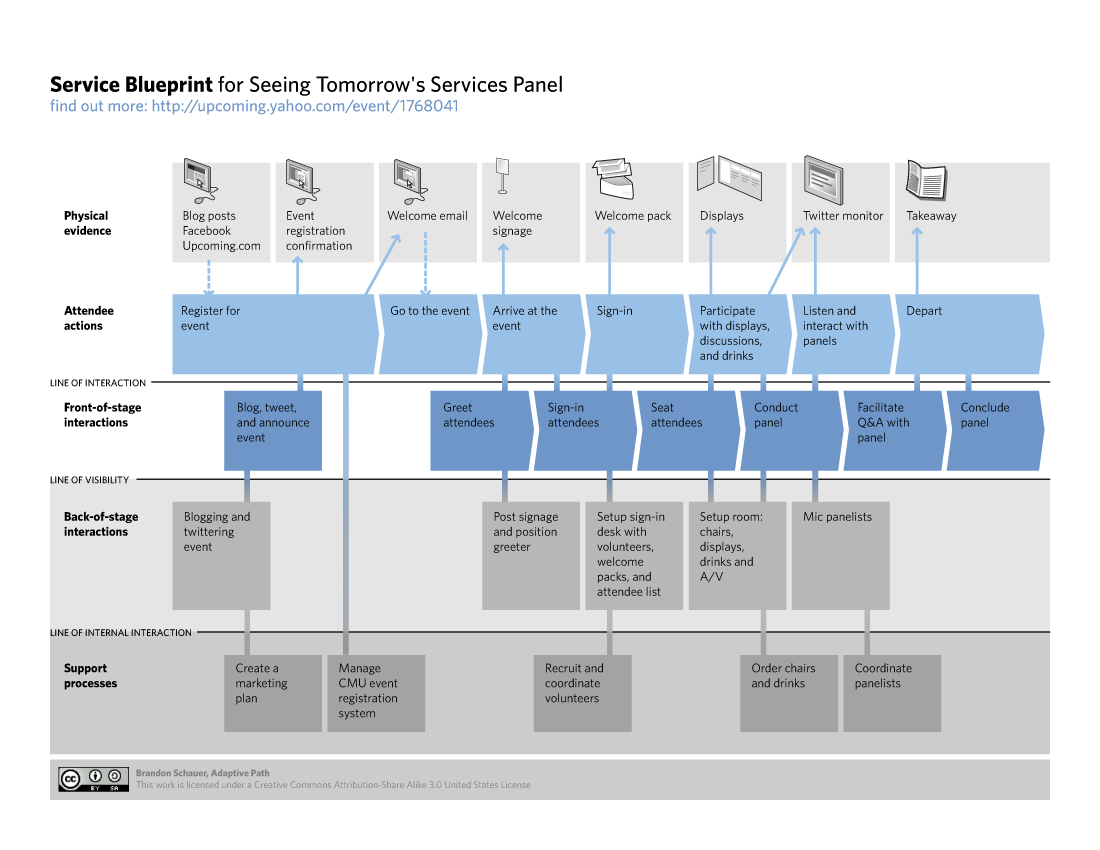
NOTE: Multiple users are usually added to the People actions because more than one user is often needed to complete a process step. A couple users make for a simple blueprint in a quick amount of activity time, while an increased number of users make for a more complex blueprint which will take longer to create.